ଆମେ ତିନୋଟି ହାଇଲାଇଟର ଜ୍ୟାମିତି ଇଞ୍ଜିନ୍କୁ ଷ୍ଟାମ୍ପ୍ରେ କାହିଁକି ବଦଳାଇଲୁ
 Gaoge Zhang
ବାସ୍ତବ Apple Pencil ତଥ୍ୟ ତ୍ରୁଟି ଦେଖାଇ Lulucat Notes କୁ MaLiang stamp model କୁ ନେଲା।
Lulucat Notes ର ଆରମ୍ଭ ଏକ ପାରମ୍ପରିକ highlighter renderer ରୁ ହୋଇଥିଲା: ନମୁନା ନିଆଯାଇଥିବା path ଚାରିପାଖରେ ଏକ ଜ୍ୟାମିତିକ outline ତିଆରି କରିବା, ତାପରେ ସେହି outline କୁ ଏକଥର ଅର୍ଦ୍ଧପାରଦର୍ଶୀ ରଙ୍ଗରେ ଭରିବା। ଏକମାତ୍ର fill ଅର୍ଦ୍ଧପାରଦର୍ଶୀ segment ଗୁଡ଼ିକ ଓଭରଲାପ୍ ହେଲେ ଦେଖାଯାଉଥିବା ଅଧିକ ଗାଢ଼ ପଟିକୁ ଏଡ଼ାଏ। ଏହା ପ୍ରତ୍ୟେକ join, self-intersection, cap ଏବଂ ଛୋଟ stroke କୁ ମଧ୍ୟ ସେହି ଏକ geometry ସମସ୍ୟା ଭିତରେ ରଖେ।
ତିନି ପିଢ଼ିର custom geometry ପ୍ରତ୍ୟେକଟି ଗୋଟିଏ ଶ୍ରେଣୀର ତ୍ରୁଟି ହଟାଇ ଅନ୍ୟ ଏକକୁ ପ୍ରକାଶ କଲା। ବର୍ତ୍ତମାନ ଆମେ ବ୍ୟବହାର କରୁଥିବା renderer MaLiang ଉପରେ ଆଧାରିତ ନରମ ବୃତ୍ତାକାର stamp ବ୍ୟବହାର କରେ, ଯାହା Harley-xk ଙ୍କ MIT-ଲାଇସେନ୍ସପ୍ରାପ୍ତ open-source drawing framework। outline ର ସମ୍ପୂର୍ଣ୍ଣ ଏକ ଶ୍ରେଣୀର ବିଫଳତା ହଟାଇବା ବଦଳରେ ଆମେ ଅଧିକ ଗାଢ଼ self-intersection ଏବଂ pressure ଯୋଗୁଁ କ୍ରମେ ପତଳା ହେଉଥିବା ଶେଷଗୁଡ଼ିକୁ ଗ୍ରହଣ କଲୁ।
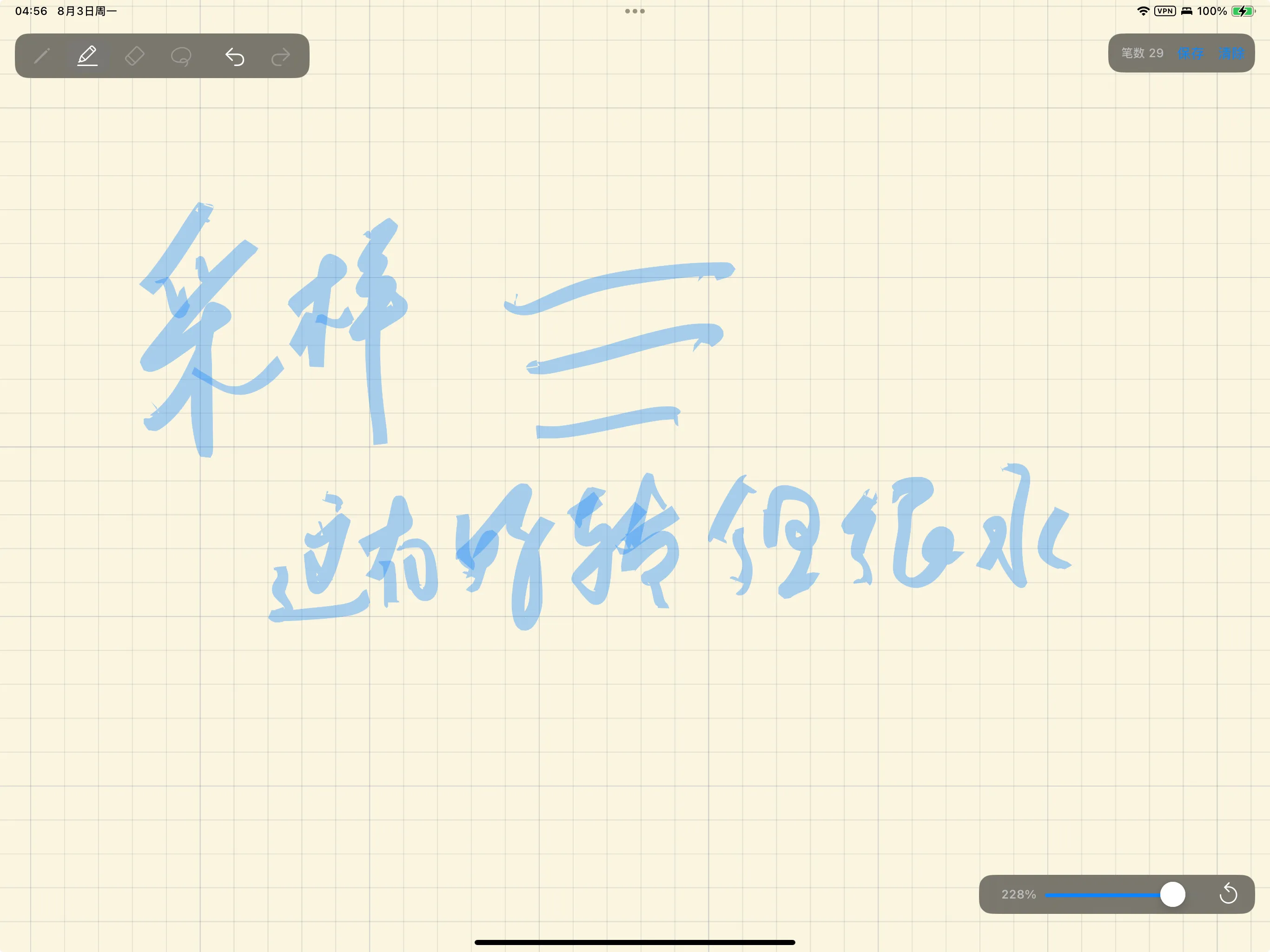
ମୂଳ device screenshot କୁ 228% zoom ରେ ଦେଖାଯାଇଛି। ଅନେକ stroke ର ଦୁଇ ଶେଷରେ ଛୋଟ hook ଦେଖାଯାଉଛି।
କୃତ୍ରିମ scene ରେ ନଥିବା hook ବାସ୍ତବ ହସ୍ତଲିପିରେ ଦେଖାଗଲା
ଆମର synthetic scene ଗୁଡ଼ିକ ସିଧା ରେଖା, arc, ଛୋଟ tap, backtrack, pressure ପରିବର୍ତ୍ତନ ଏବଂ ତୀକ୍ଷ୍ଣ ମୋଡ଼କୁ ଆବୃତ କରିଥିଲା, ଏବଂ ସେସବୁ ସଫା ଭାବରେ render ହୋଇଥିଲା। ବାସ୍ତବ ଚୀନ୍ ହସ୍ତଲିପି ତଥାପି ଅନେକ stroke ର ଆରମ୍ଭ ଓ ଶେଷରେ ପ୍ରାୟ 1–3 points ଲମ୍ବା hook ସୃଷ୍ଟି କଲା।
ତେଣୁ ଆମେ app ରେ ଏକ save button ଯୋଡ଼ି 29ଟି ସମ୍ପୂର୍ଣ୍ଣ stroke ରେକର୍ଡ କଲୁ। ପ୍ରତ୍ୟେକ sample ନିଜର position, radius, pressure, azimuth, altitude, timestamp ଏବଂ UIKit estimation flags ରଖିଲା। ଏକ offline program ସେହି JSON କୁ decode କରି app ବ୍ୟବହାର କରୁଥିବା ସମାନ Stroke.swift, StrokeRenderer.swift ଏବଂ HighlighterStrokeBuilder.swift files କୁ compile କଲା। ଏହାର output device screenshot ସହ stroke ପରେ stroke ମେଳ ଖାଇଲା, hook ସହିତ।
ରେକର୍ଡ ହୋଇଥିବା input ମାତ୍ରରୁ offline renderer ତ୍ରୁଟିଟିକୁ ପୁନରୁତ୍ପାଦନ କରିପାରିଥିବାରୁ, କାରଣ display behavior ରେ ନୁହେଁ, sample ଏବଂ geometry ରେ ଥିଲା। ଏବେ ଆମେ renderer ଭିତରକୁ ପ୍ରବେଶ କରିଥିବା ଠିକ୍ sample ଗୁଡ଼ିକୁ ପଢ଼ିପାରୁଥିଲୁ।
ଆମର ପ୍ରଥମ ଅନୁମାନ touchdown ଏବଂ lift-off ସମୟରେ ଅନୁମାନିତ Pencil orientation କୁ ଦୋଷ ଦେଲା। ତଥ୍ୟ ଏହାକୁ ଖାରଜ କଲା। ସମସ୍ତ 29ଟି stroke ରେ ପ୍ରଥମ ଓ ଶେଷ ଆଠଟି sample ମଧ୍ୟରେ azimuth ସର୍ବାଧିକ 0.09 radians ଏବଂ altitude ସର୍ବାଧିକ 0.02 radians ବଦଳିଥିଲା, ଏବଂ ସେହି iPad ରେ ପ୍ରତ୍ୟେକ estimation flag false ଥିଲା। Orientation ସ୍ଥିର ରହିଥିଲା, ଯେତେବେଳେ pressure ଏବଂ direction ତୀକ୍ଷ୍ଣ ଭାବରେ ବଦଳିଥିଲା।
ତଥ୍ୟର ଏକ ସ୍ପଷ୍ଟ ଖାଲି ସ୍ଥାନରୁ pressure floor ମିଳିଲା
ରେକର୍ଡ ହୋଇଥିବା ପ୍ରତ୍ୟେକ stroke ର ଶେଷ sample ର pressure 0.000 ଥିଲା। ଲେଖିବା ସମୟର sample ଗୁଡ଼ିକ 0.01 କିମ୍ବା ତାଠାରୁ ଅଧିକ ଥିଲା, ଯେତେବେଳେ Pencil ପୃଷ୍ଠରୁ ଉଠିଯିବା ପରେ ରେକର୍ଡ ହୋଇଥିବା sample ଗୁଡ଼ିକ 0.002 କିମ୍ବା ତାଠାରୁ କମ୍ ଥିଲା। ସେହି airborne sample ଗୁଡ଼ିକ ପ୍ରାୟତଃ 2–7 points ପର୍ଯ୍ୟନ୍ତ ଚାଲୁ ରହି 0.8–9.0 points ଦୂର ଯାଉଥିଲା, ଏବଂ ସେମାନଙ୍କ direction ଲେଖାଯାଇଥିବା stroke ଠାରୁ ପ୍ରାୟ 90 degrees ଦୂରକୁ ଘୁରିପାରୁଥିଲା।
Stroke 2 ଏହି mechanism ଦେଖାଏ। ଏହାର body 143 ରୁ 180 degrees ମଧ୍ୟରେ ଶେଷ ହୋଇଥିଲା। ତାପରେ low-pressure tail −90 ରୁ −67 degrees ଦିଗକୁ ଘୁରି ଆଉ 8.5 points ଯାଇଥିଲା। outline renderer ଶେଷ airborne point କୁ authoritative endpoint ଭାବରେ ନେଇଥିଲା, ତେଣୁ ସେହି point ଦିଗକୁ ଏକ ସରୁ geometry ଖଣ୍ଡକୁ ଟାଣିଦେଇଥିଲା।
ମପାଯାଇଥିବା pressure ଲେଖିବା ଓ airborne movement ମଧ୍ୟରେ ପ୍ରାୟ ଗୋଟିଏ order of magnitude ର ତାରତମ୍ୟ ଦେଖାଇଥାଏ, ତେଣୁ ଆମେ ସେହି gap ଭିତରେ cutoff ରଖିଲୁ:
private static let pressureFloor: CGFloat = 0.005କେବଳ ଦୁଇ ଶେଷରେ ଥିବା low-pressure sample ହଟାଯାଏ। stroke ର ମଝିରେ ଥିବା low-pressure sample ତାହାର ଅଂଶ ହୋଇ ରହେ। ଏହି ନିୟମ ମାପାଯାଇଥିବା event boundary କୁ ଅନୁସରଣ କରେ ଏବଂ ଲେଖାଯାଇଥିବା path କୁ ଅସମ୍ପାଦିତ ରଖେ।
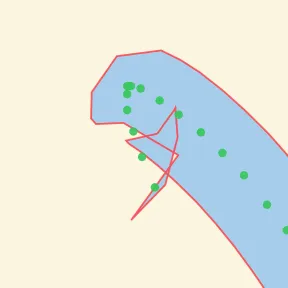
trim କରିବା ପୂର୍ବରୁ renderer airborne sample ଗୁଡ଼ିକରେ cap କୁ anchor କରେ। ସବୁଜ ବିନ୍ଦୁଗୁଡ଼ିକ raw sample; ଲାଲ ରେଖାଟି generated outline।
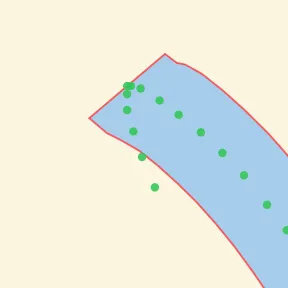
0.005 ଠାରୁ କମ୍ sample trim କରିବା ପରେ cap ଶେଷ ଲେଖାଯାଇଥିବା point ରେ ଶେଷ ହୁଏ। ଏହି pressure floor ବର୍ତ୍ତମାନର stamp renderer ରେ ରହିଛି।
ଏହି floor ଲମ୍ବା airborne hook ଗୁଡ଼ିକୁ ହଟାଇଦେଲା। ଯେଉଁ ଛୋଟ touchdown drag ଏବଂ lift-off arc ର pressure 0.005 ଠାରୁ ଅଧିକ ରହିଲା, ସେଗୁଡ଼ିକ ରହିଗଲା, କାରଣ ସେଗୁଡ଼ିକ ଲେଖାଯାଇଥିବା ଗତି। outline model ଭିତରେ ସେହି ଗତିଗୁଡ଼ିକୁ ସମ୍ଭାଳିବା ଜ୍ୟାମିତିର ପରବର୍ତ୍ତୀ ପର୍ଯ୍ୟାୟକୁ ନେଇଗଲା।
ତିନୋଟି geometry engine ତ୍ରୁଟିଗୁଡ଼ିକୁ କେବଳ ସ୍ଥାନାନ୍ତର କଲା
ପ୍ରଥମ ପିଢ଼ି: ଗୋଟିଏ outline, ଗୋଟିଏ fill
ପ୍ରଥମ pressure-sensitive engine ଏକ ପରିଚିତ pipeline ଅନୁସରଣ କଲା। ଏହା ଏକ spine କୁ smooth କରି, ବାମ ଓ ଡାହାଣ offset ହିସାବ କରି, ସେଗୁଡ଼ିକୁ ଗୋଟିଏ polygon ରେ ଯୋଡ଼ି ଏକଥର ସେହି polygon କୁ fill କରୁଥିଲା। nib ଟି Apple Pencil azimuth ଏବଂ altitude ଦ୍ୱାରା ନିୟନ୍ତ୍ରିତ ଏକ ellipse ଥିଲା, ତେଣୁ ଲେଖିବାର direction ସହିତ ଏହାର cross-section ବଦଳୁଥିଲା। ଛୋଟ tap ପାଇଁ ଏକ ଅଲଗା shape ଥିଲା, ଏବଂ flat cap ଗୁଡ଼ିକ zero-winding pocket ଏଡ଼ାଇବା ପାଇଁ ଛୋଟ asymmetry ବ୍ୟବହାର କରୁଥିଲା।
ଏକମାତ୍ର fill stroke ଭିତରେ opacity ସଞ୍ଚୟ ସମସ୍ୟାକୁ ସମାଧାନ କଲା, ଏବଂ ପ୍ରତ୍ୟେକ ମୋଡ଼ରେ ଏକ valid polygon ଆବଶ୍ୟକ କଲା। Touchdown drag ଗୁଡ଼ିକ cap ଏବଂ body ମଧ୍ୟରେ wedge ତିଆରି କରୁଥିଲା। Backtrack ଗୁଡ଼ିକ ଧଳା crescent pocket ତିଆରି କରିପାରୁଥିଲା। ତୀକ୍ଷ୍ଣ ମୋଡ଼ inner outline କୁ self-intersect କରାଇ unfilled notch ଛାଡ଼ିପାରୁଥିଲା।
ଦ୍ୱିତୀୟ ପିଢ଼ି: ଏହାର ଶେଷ ନିକଟରେ outline କୁ ମରାମତି କରିବା
ଦ୍ୱିତୀୟ engine outline କୁ ରଖି ସ୍ଥାନୀୟ repair ଯୋଡ଼ିଲା: backtrack trimming, ପ୍ରାରମ୍ଭିକ estimated property ପାଇଁ damping, endpoint straightening, transient-direction trimming ଏବଂ ଏକ ଛୋଟ cap extension। ପ୍ରତ୍ୟେକ patch ପୁନରୁତ୍ପାଦିତ ଏକ ତ୍ରୁଟିକୁ ସମାଧାନ କଲା। ସମସ୍ତ patch ମିଶି endpoint behavior କୁ ଅନେକ threshold ଏବଂ window ଉପରେ ନିର୍ଭରଶୀଳ କରିଦେଲା।
ବାସ୍ତବ ଲେଖା ତାପରେ ସେହି window ଗୁଡ଼ିକର ବାହାରେ ଥିବା case ଦେଖାଇଲା। ଏକ fixed 24-point straightening window ଛୋଟ stroke ର ଇଚ୍ଛାକୃତ hook କୁ ମିଟାଇଦେଲା। ଏକ adaptive window ସେହି hook କୁ ରଖିଲା, କିନ୍ତୁ lift-off arc ତଥାପି ଦୃଶ୍ୟମାନ corner ହୋଇପାରୁଥିଲା। Direction-aware trimming ଅଧିକ transient motion ହଟାଇଲା, କିନ୍ତୁ ଗୋଟିଏ ରେକର୍ଡ ହୋଇଥିବା stroke ର ସତ୍ୟିକାର ବକ୍ର ଆରମ୍ଭର ପ୍ରାୟ 2.5 points ମଧ୍ୟ ତ୍ୟାଗ କରିବାକୁ ପଡ଼ିଲା।
ପ୍ରତ୍ୟେକ patch ତାହାର ଲକ୍ଷ୍ୟ ମାମଲାକୁ ଠିକ୍ କଲା। କିନ୍ତୁ ସେମାନଙ୍କ ତଳେ ଥିବା model ଏପର୍ଯ୍ୟନ୍ତ ଏମିତି ଏକ କଠିନ outline ଆବଶ୍ୟକ କରୁଥିଲା, ଯାହା noisy, curved input ରେ valid ରହିପାରିବ।
ତୃତୀୟ ପିଢ଼ି: clipped square cap ସହ coverage union
ତୃତୀୟ engine ଗୋଟିଏ single contour ତିଆରି କରିବା ବନ୍ଦ କଲା। ଏହା ପ୍ରତ୍ୟେକ segment ପାଇଁ ଏକ trapezoid ଏବଂ ପ୍ରତ୍ୟେକ interior sample ରେ ଏକ disc କୁ grayscale mask ଭିତରେ ଅଙ୍କିଲା, ସେମାନଙ୍କ coverage union ନେଲା, ତାପରେ highlighter color କୁ ଏକଥର ପ୍ରୟୋଗ କଲା। Backtrack crescent, self-intersection darkening ଏବଂ zero-winding hole ଅଦୃଶ୍ୟ ହୋଇଗଲା, କାରଣ renderer ଆଉ polygon winding ଉପରେ ନିର୍ଭର କରୁନଥିଲା।
Union ଶେଷଗୁଡ଼ିକୁ ଗୋଲାକାର କରିଦେଲା, ତେଣୁ ଆମେ coverage କୁ ଦୁଇ endpoint half-plane ସହ clip କରି square cap ପୁନଃସ୍ଥାପନ କଲୁ। ସେହି clip constant-pressure straight line ପାଇଁ କାମ କଲା, କିନ୍ତୁ ଆଉ ଅଧିକ ଗୁରୁତର ଏକ ତ୍ରୁଟି ଆଣିଲା: ଏକ curved stroke ର body ସ୍ୱାଭାବିକ ଭାବରେ endpoint half-plane କୁ ଅତିକ୍ରମ କରିପାରେ, ଏବଂ cap clip ତାପରେ stroke ର ମଝିର କିଛି ଅଂଶ ହଟାଇଦେଏ। live input ସମୟରେ endpoint direction ବଦଳୁଥିବାରୁ clipped area ମଧ୍ୟ ଚାଲୁଥିଲା ଏବଂ stroke flicker କରୁଥିଲା।
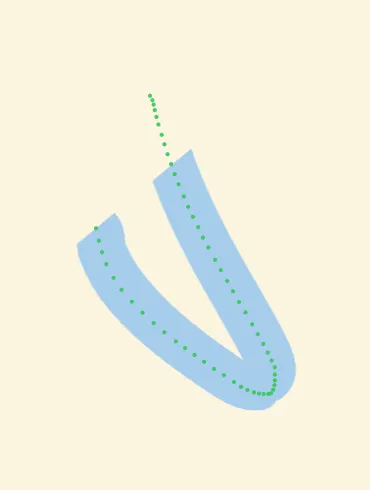
global cap constraint ଏକ ବକ୍ର stroke ର body ମଧ୍ୟଦିଆରେ କାଟିଯାଏ।
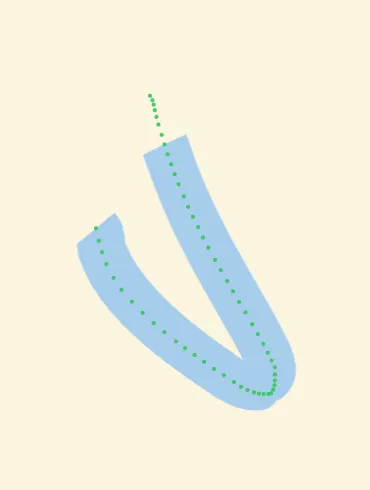
cap clipping କୁ endpoint ର ଗୋଟିଏ half-width ମଧ୍ୟରେ ଥିବା primitive ପର୍ଯ୍ୟନ୍ତ ସୀମିତ କଲେ ଏହି stroke ପୁନଃସ୍ଥାପିତ ହୁଏ।
ଏକ arc-length gate cap clipping କୁ ସ୍ଥାନୀୟ କରି ପ୍ରତ୍ୟେକ ରେକର୍ଡ ହୋଇଥିବା case କୁ ଠିକ୍ କଲା। ଗୋଟିଏ extreme synthetic hook ତଥାପି ଏକ ଛୋଟ ଧଳା notch ଦେଖାଇଲା, ଯେଉଁଠାରେ low-pressure tip clipped cap ସହିତ ମିଶିଥିଲା। ତୃତୀୟ engine ପୁଣି ଗୋଟିଏ geometry failure ବଦଳରେ ଅନ୍ୟଟିକୁ ଗ୍ରହଣ କରିଥିଲା।
MaLiang କଠିନ ସୀମାକୁ ହଟାଇଦିଏ
MaLiang ଗୋଟିଏ ବନ୍ଦ outline ପରିବର୍ତ୍ତେ ପୁନରାବୃତ୍ତି texture stamp ଦ୍ୱାରା stroke ତିଆରି କରେ। ଏହାର path generator ଏପରି quadratic Bézier segment ବ୍ୟବହାର କରେ, ଯାହା ପାଖପାଖି sample ର midpoint ମଧ୍ୟଦିଆରେ ଯାଏ, ଏବଂ ଏହାର line renderer ସେହି path ଉପରେ ନିୟମିତ step ରେ stamp ରଖେ। ସମଗ୍ର stroke ଜୁଡ଼ି stamp ର size, rotation, color ଏବଂ opacity ପରିବର୍ତ୍ତିତ ହୋଇପାରେ।
ଏକ soft stamp ରେ ଅଲଗା cap, join କିମ୍ବା winding rule ନଥାଏ। direction ର ତୀକ୍ଷ୍ଣ ପରିବର୍ତ୍ତନ ଓଭରଲାପ୍ ହେଉଥିବା mark ଗୁଡ଼ିକର ଏକ କ୍ରମ ହୋଇ ରହେ। Backtrack ଏକ ଖାଲି polygon pocket ତିଆରି କରିପାରେ ନାହିଁ, ଏବଂ endpoint half-plane stroke ର ମଝିକୁ କାଟିପାରେ ନାହିଁ, କାରଣ model ରେ endpoint clip ନାହିଁ।
ଆମେ code ନୁହେଁ, model କୁ ଗ୍ରହଣ କଲୁ। ବର୍ତ୍ତମାନର HighlighterStrokeBuilder ଚାରିଟି operation କରେ:
- କେବଳ ଯେଉଁ endpoint sample ର pressure
0.005ଠାରୁ କମ୍, ସେଗୁଡ଼ିକୁ ହଟାଇବା। - midpoint quadratic Bézier segment ସହିତ position କୁ smooth କରିବା।
- arc length ର ପ୍ରତ୍ୟେକ point ପାଇଁ ଗୋଟିଏ circular stamp ରଖିବା।
- normalized pressure ରୁ stamp diameter ନିର୍ଦ୍ଧାରଣ କରି source-over alpha ସହ stamp ଗୁଡ଼ିକୁ composite କରିବା।
Builder 686 line ରୁ 190 କୁ କମିଗଲା। Azimuth, altitude, outline construction, union mask, endpoint direction window, cap extension ଏବଂ cap clipping ସବୁ highlighter path ରୁ ବାହାରିଗଲା। ଆମେ ଏପର୍ଯ୍ୟନ୍ତ Pencil orientation ରେକର୍ଡ କରୁଛୁ, କାରଣ input model ଏହାକୁ ସମର୍ଥନ କରେ, କିନ୍ତୁ highlighter ନିଜେ ଆଉ ସେହି field ଗୁଡ଼ିକୁ ପଢ଼ୁନାହିଁ।
MaLiang ର pressure formula ପାଇଁ device calibration ଆବଶ୍ୟକ ହେଲା
MaLiang ଏକ formula ଦ୍ୱାରା stamp ର size ନିର୍ଦ୍ଧାରଣ କରେ, ଯାହାର ସମତୁଲ୍ୟ ରୂପ ହେଉଛି
ଏହା ଧରିନିଏ ଯେ force 0 ରୁ 1 ପର୍ଯ୍ୟନ୍ତ range ର ଉପଯୋଗୀ ଅଂଶ ବ୍ୟବହାର କରେ। ଆମ device ତଥ୍ୟ ଏହା କରୁନଥିଲା। ପ୍ରାୟ 3,400ଟି Apple Pencil sample ମଧ୍ୟରେ median pressure 0.047 ଏବଂ maximum 0.178 ଥିଲା। ସେହି value ଗୁଡ଼ିକୁ ସିଧାସଳଖ formula ରେ ଦେଲେ ସାଧାରଣ ଲେଖା nominal brush size ଠାରୁ ଅନେକ ପତଳା ହୋଇଯାଉଥିଲା।
ତେଣୁ ଆମେ ଦେଖାଯାଇଥିବା median ଚାରିପାଖରେ normalize କରି, ତାପରେ exponent ପ୍ରୟୋଗ କରି result କୁ clamp କଲୁ:
ଏବେ median written pressure nominal 12-point diameter କୁ map ହୁଏ। ଅତ୍ୟନ୍ତ ହାଲୁକା contact nominal size ର 35% ରେ ଦୃଶ୍ୟମାନ ରହେ, ଯେତେବେଳେ ଭାରି pressure 120% ରେ ବଢ଼ିବା ବନ୍ଦ କରେ।
ଏହି calibration input device ଏବଂ brush behavior ର ଅଂଶ, MaLiang ର ନୁହେଁ। ନିଜ pressure distribution ମାପିବା ବିନା ମୂଳ formula କୁ କପି କଲେ architecture ରହିଯାଇଥାନ୍ତା, କିନ୍ତୁ brush ଭୁଲ୍ ହୋଇଥାନ୍ତା।
ଜଣା overlap count ରୁ ପ୍ରତ୍ୟେକ stamp ର alpha ମିଳିଲା
MaLiang ଓଭରଲାପ୍ ହେଉଥିବା translucent stamp ପାଇଁ empirical expression alpha ÷ overlapping × 2.5 ଦ୍ୱାରା compensation କରେ। ଆମ brush ର fixed 12-point nominal diameter ଏବଂ 1-point stamp step ଥିବାରୁ, ଏହାର centerline ପ୍ରାୟ 12ଟି layer ପାଏ। ଆମ case ରେ overlap count ଜଣା, ତେଣୁ compensation କୁ ଅନୁମାନ କରିବା ବଦଳରେ ସମାଧାନ କରାଯାଇପାରେ।
ଏକ target stroke opacity
ତେଣୁ ଗୋଟିଏ stamp ପାଇଁ ଆବଶ୍ୟକ
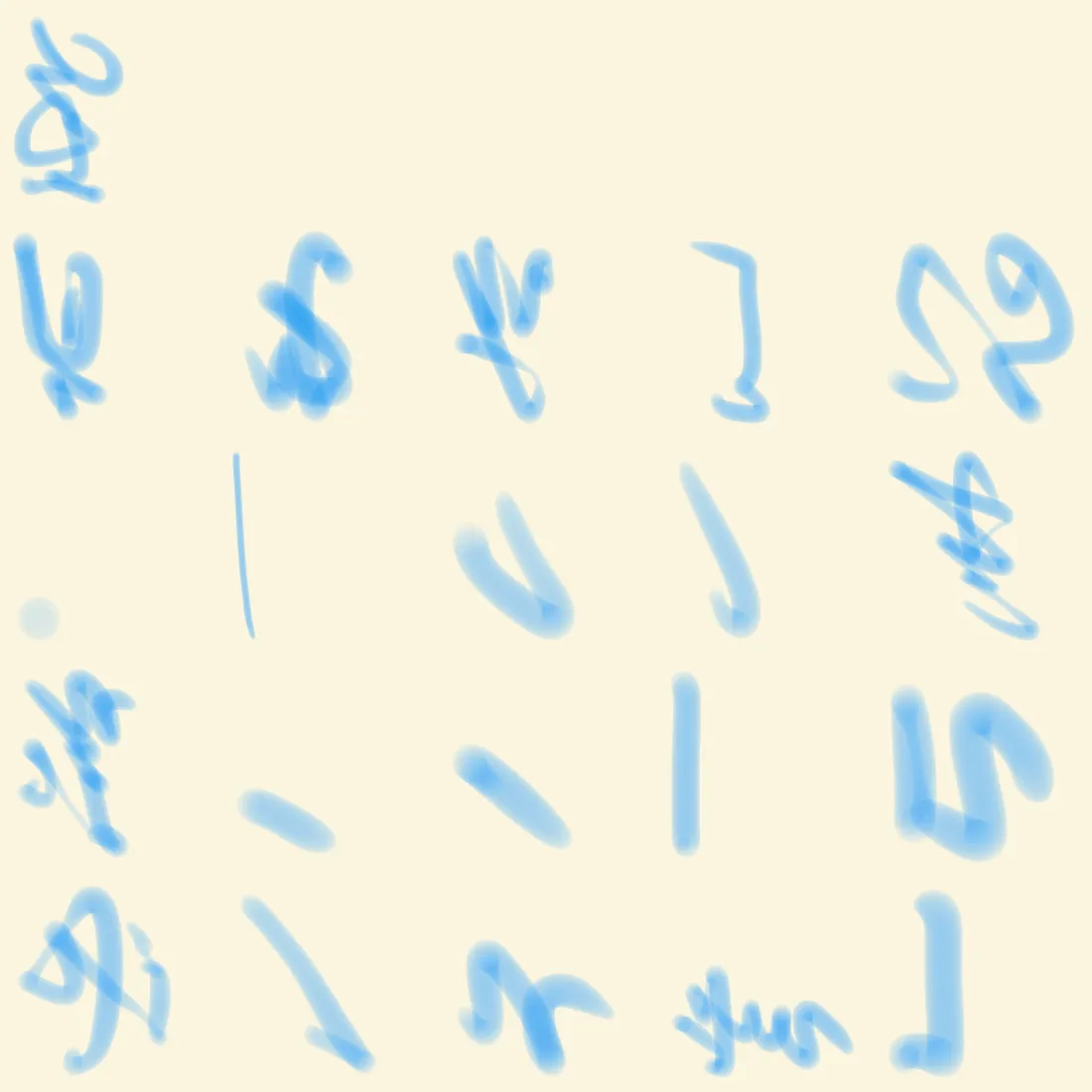
ରେକର୍ଡ ହୋଇଥିବା device path ଗୁଡ଼ିକୁ ଶେଷ renderer ପୁନର୍ବାର ଚଲାଉଛି। Hook, diagonal cut ଏବଂ ଧଳା pocket ଅନୁପସ୍ଥିତ।
ଆମେ ଗ୍ରହଣ କରିଥିବା ଦୁଇଟି ମୂଲ୍ୟ
Self-intersection ଗୁଡ଼ିକ ଅଧିକ ଗାଢ଼ ହୋଇଯାଏ। source-over composition ପ୍ରତ୍ୟେକ stamp କୁ ଗଣନା କରେ, ଏଥିରେ ସେହି ଅଞ୍ଚଳ ଦେଇ ପୂର୍ବରୁ ଯାଇଥିବା pass ର stamp ମଧ୍ୟ ଅନ୍ତର୍ଭୁକ୍ତ, ଯେତେବେଳେ coverage-union engine ଏହାକୁ ଏଡ଼ାଇଥିଲା। ଆମେ ଅଧିକ ଗାଢ଼ overlap କୁ ଗ୍ରହଣ କଲୁ, କାରଣ ଏହା ପୂର୍ବାନୁମାନଯୋଗ୍ୟ ଏବଂ stroke ର ଆକାରକୁ ଅକ୍ଷୁଣ୍ଣ ରଖେ।
Pressure ସହ endpoint ଗୁଡ଼ିକ ସରୁ ହୋଇଯାଏ। ବାସ୍ତବ lift-off pressure କୁ କମାଇଦିଏ, ଯାହା stamp diameter କୁ କମାଏ, ତେଣୁ stroke ପୂର୍ଣ୍ଣ-ପ୍ରସ୍ଥ square cap ରେ ଶେଷ ହେବା ବଦଳରେ କ୍ରମେ ପତଳା ହୁଏ। ତିନୋଟି geometry engine ମାଧ୍ୟମରେ ଆମେ ସେହି square cap କୁ ଏକ ଆବଶ୍ୟକତା ଭାବରେ ଧରିଥିଲୁ। ଏହାକୁ ଛାଡ଼ିଦେବାରୁ ଉପରୋକ୍ତ ଅନେକ ବିଫଳତା ପଛରେ ଥିବା clipping ଏବଂ endpoint machinery ହଟିଗଲା, ତେଣୁ ଆମେ tapered end କୁ ଗ୍ରହଣ କଲୁ।
ତେଣୁ ଆମେ ship କରୁଥିବା model ପୂର୍ବରୁ ଥିବା model ଗୁଡ଼ିକଠାରୁ କମ୍ କାମ କରେ। ଏହା ମାପାଯାଇଥିବା writing event କୁ ସଂରକ୍ଷଣ କରେ, device calibration ପରେ pressure ରେ ପ୍ରତିକ୍ରିୟା କରେ, ଏବଂ globally valid outline ଆବଶ୍ୟକ ନକରି curved ଓ self-crossing path render କରେ। Chisel-shaped nib, ସମ୍ପୂର୍ଣ୍ଣ square cap ଏବଂ raw sample ମଧ୍ୟରେ ଥିବା exact polyline—ଏହାର ବଦଳରେ ଆମେ ଯେଉଁ feature ଗୁଡ଼ିକ ଛାଡ଼ିଲୁ ସେଗୁଡ଼ିକ ହେଲା।
pressure floor ଅନ୍ୟ project ଗୁଡ଼ିକୁ ସବୁଠାରୁ ସିଧାସଳଖ ଭାବରେ ଲାଗୁ ହୁଏ। 0.005 value ବାସ୍ତବ input ର ଦୁଇଟି cluster ମଧ୍ୟର gap ରୁ ଆସିଥିଲା: 0.01 ଏବଂ ତାଠାରୁ ଅଧିକ pressure ରେ ଲେଖା, ଏବଂ 0.002 ଏବଂ ତାଠାରୁ କମ୍ pressure ରେ airborne tracking। ସେହି ରେକର୍ଡ ହୋଇଥିବା stroke ଗୁଡ଼ିକ ପ୍ରତ୍ୟେକ geometry repair କେଉଁଠାରେ ବିଫଳ ହେଲା ଦେଖାଇଲେ। ସେହି ବିଫଳତାଗୁଡ଼ିକ stamp model କୁ ନେଇଗଲା ଏବଂ ଏହା ବହନ କରୁଥିବା ଦୁଇଟି ମୂଲ୍ୟକୁ ନିର୍ଦ୍ଧାରଣ କଲା।