Two Erasers, and Why the Erasure Belongs to the Stroke
 Gaoge Zhang
An eraser stroke as its own element is the obvious design. Object movement breaks it, so in Lulucat Notes the erasure belongs to the stroke from which it removes ink.
People mean two different things when they erase in a notebook. Sometimes a mark is wrong and the whole mark should go: a guide line, a crossed-out word, a stray stroke from a resting palm. Sometimes only part of a mark is wrong: half a character, one branch of a diagram, the tail of a highlighter sweep that ran past the sentence. Lulucat Notes now ships both, as two separate tools.
The harder design question is where the erasure lives.
The stroke eraser came first
The first eraser deleted whole strokes. A touch tests every stroke: bounding boxes reject almost all of them, and the survivors get a point-to-segment squared distance test against the eraser radius plus the stroke radius interpolated along that segment. Width varies with pressure, so a single nominal width would delete thin strokes the user did not touch and miss thick ones that were touched.
One gesture merges into one undo entry, and the entry stores each removed stroke together with its original index. Undo inserts them back in reverse order, so stacking order comes back exactly as it was.
This eraser is fast, predictable, and unable to remove half a word.
MaLiang makes the eraser a brush
MaLiang, the drawing framework licensed under the MIT licence whose highlighter stamp model we had already borrowed, answers partial erasing in twenty-four lines. Its Eraser is a Brush subclass that overrides one thing, the blend options, to subtract instead of add. An eraser stroke is an element in the same list as every other stroke. Undo removes that element. No existing stroke is modified, because the erasure only happens during replay, in list order.
We shipped that model, and two device sessions broke it.
Object move exposes the missing owner
The first report read: select strokes with the lasso, drag them, and the hole stays behind.
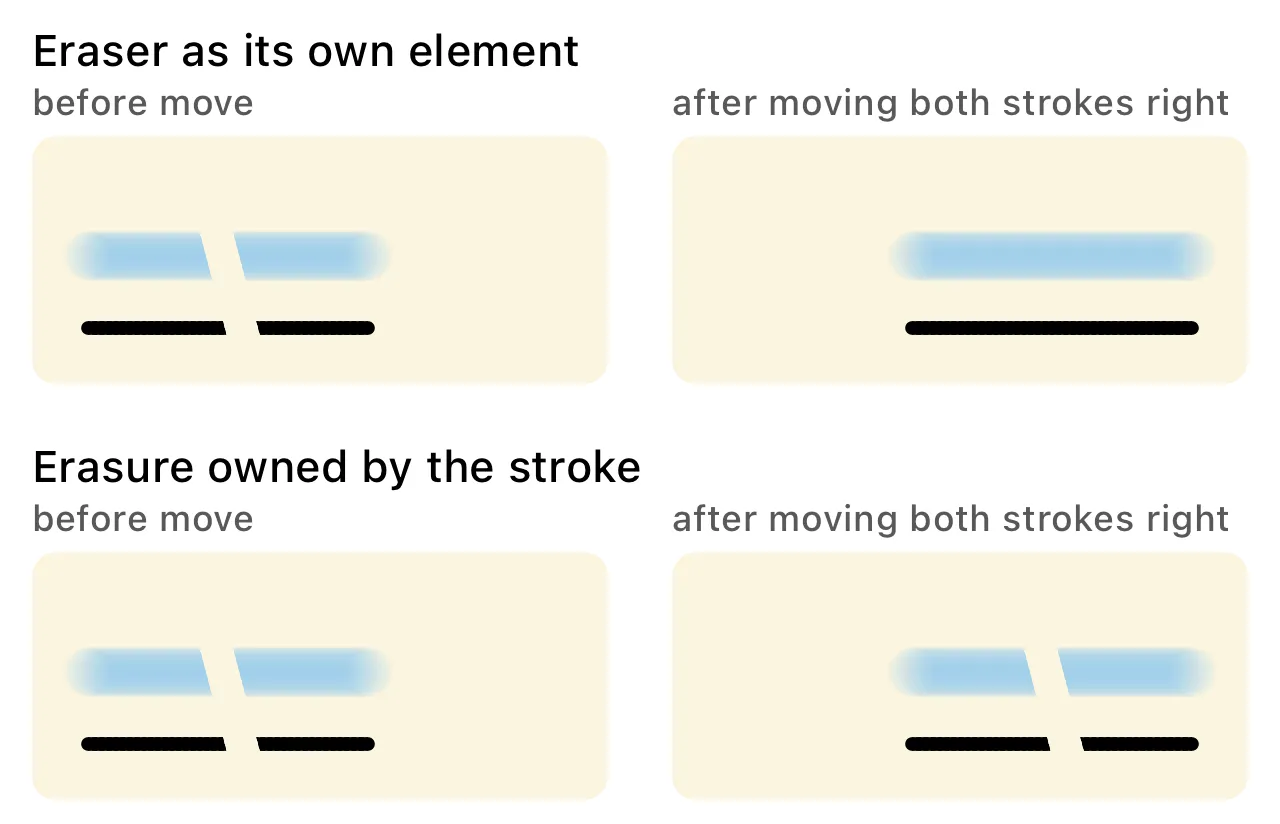
The same erased strokes, moved to the right. Above: the eraser is an element of its own. Below: the erasure belongs to the strokes.
Selection made it worse. Selected strokes lift out of the bitmap into an overlay that draws them directly, without the eraser element, so the moment you selected an erased stroke it appeared whole again.
The second report: the eraser floated above the highlighter. Our renderer replays in two passes, highlighters first and pens second, because highlighter ink must sit under ink. An eraser element has to take part in both passes, otherwise it cannot erase both kinds. Taking part in the pen pass means running after every highlighter has been drawn, so an eraser also cut highlighter strokes that were drawn later in time.
Both failures have the same source. MaLiang has no lasso, no move, and no layer order between brushes, so an element with no owner is enough there. Our canvas has all three, and an erasure with no owner has no defined answer to “what happens when the ink moves” or “which layer is this operating on.”
Erasure owned by the stroke
Every Stroke now carries its own erase paths. The eraser tests which strokes it touches and appends a path to each of them, in canvas coordinates. Rendering one stroke draws its ink and its own erasures inside a transparency layer:
context.beginTransparencyLayer(auxiliaryInfo: nil)
drawInk(stroke, in: context, clip: clip, colorOverride: colorOverride)
context.setBlendMode(.destinationOut)
for path in stroke.erasePaths { fillErasePath(path, in: context) }
context.endTransparencyLayer()
Destination-out keeps the destination and removes it in proportion to the source alpha:
Inside a transparency layer the destination is that one stroke, so the operation cannot reach the paper, the strokes underneath, or the strokes drawn later. The layer costs nothing for strokes without erasures, which is almost all of them: those take the original path.
Ownership answers the two failures directly. Translation moves the erase paths along with the sample points, so a moved stroke carries its gaps. The selection overlay draws the same stroke object, so a selected stroke shows the same gaps. Layer order stops mattering, because an erasure never applies to anything except its own stroke.
Undo works on the gesture: one entry lists every (stroke, path) pair that gesture produced, undo removes those paths, redo appends them again. The ink under an erasure is never edited, so nothing has to be reconstructed.
Live feedback goes through the tile bitmap
The stroke being drawn is normally rendered as an overlay above the composited page. An erasure cannot work there, because that overlay sits on top of paper as well as ink, and destination-out would punch through the paper.
So the eraser writes into the strokes immediately, and each batch of new samples triggers a local replay of the affected rectangle only. The tile pipeline already clears a rectangle and replays the strokes intersecting it; the eraser reuses that path and adds no second drawing semantic.
Both erasers, side by side
The toolbar has two eraser buttons rather than one button with a hidden mode. The partial eraser takes out part of a stroke. The stroke eraser removes whole strokes on contact. Their radii are separate constants, both currently four points.
Deleting a whole stroke takes its erase paths with it, since they are part of that stroke, and undo brings both back together. Erase paths are also part of the saved file, quantised like everything else: radius and coordinates as tenths of a point.
One limitation remains. A stroke erased down to nothing still exists as data. It renders as nothing, but the lasso can still select it and the stroke eraser can still delete it, and it still occupies space in the document. Collecting fully erased strokes needs a coverage test we have not written, so for now they stay.
When a model from another project stops working in yours, the difference is usually not in the code you copied. It is in the features that project does not have.